Nothing to install or update
Gem Diagram is a web app: open it on any machine (your studio desktop, a laptop, a Chromebook) and pick up where you left off, always on the latest version.
Gem Cut Studio is a newer desktop faceting tool, and a step up from GemCAD. Gem Diagram covers the same design work but runs in the browser on any OS, opens your existing .gcs files, and adds rough-yield planning, a step-by-step cutting assistant, and a client-facing preview link.
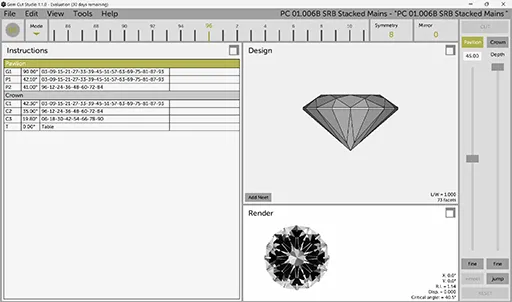
Have Gem Cut Studio designs? Import a .gcs file and Gem Diagram parses the tier table (angles, distances, indices, and any refractive index) and renders it in 3D. Where the file specifies frosting, that comes across too. No material in the file? Gem Diagram snaps to the nearest of 22 built-in materials by RI. Imports open read-only; Save keeps an editable .facet copy.
An honest, side-by-side look. Where a row is marked “coming soon” or carries a plan name, that reflects exactly what Gem Diagram ships today.
| Feature | Gem Diagram | Gem Cut Studio |
|---|---|---|
| Runs in your browser, nothing to install | ✓ | ✗ |
| Works on Mac, Windows, Linux & Chromebook | ✓ | Desktop (Windows / Mac) |
| Realistic ray-traced render (color, fire, refraction) | ✓ | Limited |
| Live 3D preview while you design | ✓ | ✓ |
| Rough Planner (best-yield orientation search) | ✓ | ✗ |
| Cutting Assistant (step-by-step at the machine) | ✓ | ✗ |
| Opens your existing Gem Cut Studio files | .gcs | — |
| Frosted-facet preview | Pro | In some .gcs files |
| Screenshot & video export | Pro | Limited |
| Client Preview link to show buyers their stone | Pro | ✗ |
| No install, automatic updates | ✓ | ✗ |
| Price | Free tier, Pro at $29/mo | $99 one-time (single user) |
Gem Diagram is a web app: open it on any machine (your studio desktop, a laptop, a Chromebook) and pick up where you left off, always on the latest version.
Beyond designing facets, the Rough Planner finds the best orientation and yield for a piece of rough, and the Cutting Assistant guides the actual cutting sequence, with auto-cut to drive it for you.
Ray-traced color, fire, and refraction in the Realistic render, plus Ray Studio for tracing light through the stone. Judge the look before a single facet is cut.
Pro's Client Preview generates a private link showing a buyer their rough with the finished gem inside it and a short rotating render clip, a closing tool no desktop editor includes.
No tool wins on everything. Here's where Gem Cut Studio is the stronger choice.
As an installed application, Gem Cut Studio runs without a connection and leans on local hardware. If you need a self-contained offline binary, that's a genuine advantage.
If your whole library and habits are already in Gem Cut Studio, staying put has zero switching cost, though Gem Diagram imports those files when you want to.
.gcs file and Gem Diagram parses its tier table (angles, distances, indices, RI, and frosting where present), then renders it in 3D. Save as .facet to edit.