Web-based, works everywhere
No download, no Windows VM on your Mac, no installer that fights a new OS version. Open a browser, sign in, and your designs are there. Updates ship continuously instead of never.
GemCAD is the program nearly every faceter learned on: the de-facto standard, with thousands of cutting designs saved in its format. But it's a retired Windows desktop app with flat wireframe diagrams. Gem Diagram runs in your browser on any OS, opens your existing GemCAD files, and renders them as realistic 3D stones with full color, fire, and refraction.
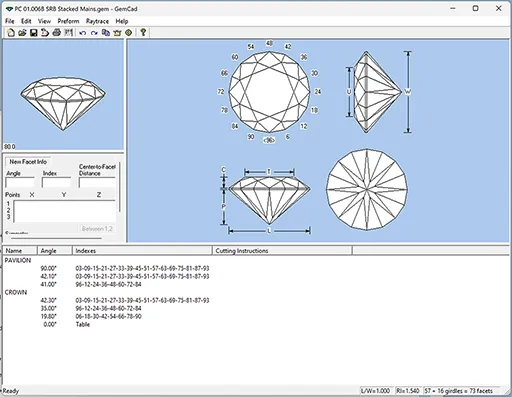
Already have GemCAD files? Open a .gem or .asc straight in Gem Diagram: drag it in and watch it render in 3D. The tiers, angles, indices, and (where present) the refractive index come across; if the file names no material, Gem Diagram snaps to the closest of its 22 built-in materials by RI. Imports open read-only, so click Save to keep it as an editable .facet file.
An honest, side-by-side look. Where a row is marked “coming soon” or carries a plan name, that reflects exactly what Gem Diagram ships today.
| Feature | Gem Diagram | GemCAD |
|---|---|---|
| Runs in your browser, nothing to install | ✓ | ✗ |
| Works on Mac, Windows, Linux & Chromebook | ✓ | Windows desktop only |
| Realistic ray-traced render (color, fire, refraction) | ✓ | ✗ (GemCAD is wireframe/geometry only; color rendering needs the companion app GemRay) |
| Live 3D preview while you design | ✓ | Wireframe / 2D diagrams |
| Rough Planner (best-yield orientation search) | ✓ | ✗ |
| Cutting Assistant (step-by-step at the machine) | ✓ | ✗ |
| Opens your existing GemCAD files | .gem, .asc | — |
| PDF cutting report | ✓ | ✓ |
| Frosted-facet preview | Pro | ✗ |
| Screenshot & video export | Pro | ✗ |
| Client Preview link to show buyers their stone | Pro | ✗ |
| Actively maintained & updated | ✓ | ✗ |
| Price | Free tier, Pro at $29/mo | Free (formerly shareware; free registration key) |
No download, no Windows VM on your Mac, no installer that fights a new OS version. Open a browser, sign in, and your designs are there. Updates ship continuously instead of never.
Gem Diagram's Realistic render ray-traces color, dispersion (fire), and internal refraction so you judge how a design will really look. Ray Studio then lets you trace individual light rays through it.
The Rough Planner searches orientations for best yield from a piece of rough, and the Cutting Assistant walks the cutting sequence tier by tier at the machine. GemCAD never covered that workflow.
Export screenshots and video, and (Pro) generate a Client Preview link that shows a buyer their rough with the finished gem inside it plus a rotating render. No desktop faceting tool offers that.
No tool wins on everything. Here's where GemCAD is the stronger choice.
Decades of published cutting designs exist as .gem/.asc files. Gem Diagram opens them, but GemCAD is where most of that catalogue was authored.
GemCAD runs entirely on your machine with no account. If you work somewhere with no internet and want a self-contained desktop binary, that's its home turf.
It's the tool a generation of faceters trained on. The muscle memory and community know-how around GemCAD are real.
.gem or .asc file from the top bar and it renders in 3D immediately. The geometry (tiers, angles, indices) and any refractive index come across; save it as a .facet file to edit it in Gem Diagram.